
Sales Stock Levels - "Invoice now, supply later" scenario
This document provides an overview of the "Invoice now, supply later" feature available in the Invoice screen. This functionality is particularly useful in scenarios where goods are invoiced but supplied at a later date, allowing for better separation of financials from stock fulfillment.
Understanding Sales Invoices
Sales Invoices are commonly used in Over The Counter (OTC) transactions, where goods are invoiced and supplied to customers immediately. However, there are instances where it is necessary to invoice a customer and fulfill the order at a later date. This is where the "Invoice now, supply later" option becomes essential.
"Invoice Now, Supply Later" Feature
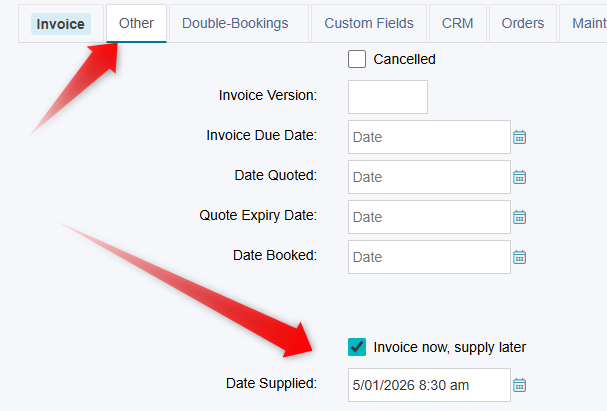
The "Invoice now, supply later" option is located in the "Other" tab of the Invoice screen. This checkbox is specifically designed for invoices and will only be visible when the system is in "Invoice" mode.
Key Points to Note
This feature allows businesses to manage their invoicing and stock fulfillment processes separately.
The checkbox is applicable only to invoices and does not affect other transaction types.
The presence of Booked or Hired dates does not influence sales-based stock control, as these fields are intended for hire-based transactions.
This checkbox does not affect sales stock levels. Its primary purpose is to allow the Date Supplied to be viewed and edited if required, and to make the sale invoice appear in Sales/Hire > Dispatch, ready for dispatch.
By utilising the "Invoice now, supply later" feature, businesses can streamline their operations and enhance customer satisfaction by providing more flexible invoicing options.