
Stripe - Online Card Payments
HirePOS is currently being fully integrated with Stripe as an alternative online card payment provider to Pin Payments for card-not-present transactions.
In the meantime, Stripe is a third-party payment platform that you can use directly outside of HirePOS. You may choose to set up your own Stripe account, securely store customer payment cards in Stripe, and process later authorised card charges through the Stripe Dashboard.
For in-person payments where the customer and card are physically present, you can continue using your normal EFTPOS terminal. This is often the most convenient option for tap, insert, or swipe payments.
For more information about EFTPOS terminals, online card payments, and securely storing customer cards, see:
https://docs.hirepos.com/en/articles/12818241
Set up a Stripe account
To set up a new Stripe account, go to:
https://stripe.com/au/payments/payment-links
Click Create a payment link, then follow the prompts to create and configure your Stripe account.
Stripe is separate third-party software and is not controlled by HirePOS. Any account setup, approval, verification, fees, payment processing, card storage, disputes, refunds, or Stripe Dashboard functionality is managed directly by Stripe.
Store a payment card securely
Sign in to the Stripe Dashboard:
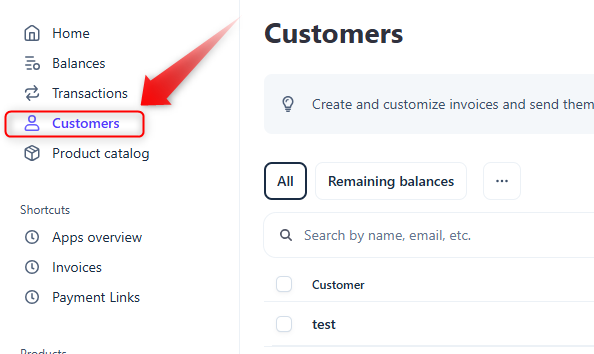
https://dashboard.stripe.comClick Customers from the menu on the left.
Click Add customer at the top-right.
Enter the customer’s Name and Email address.
Add any other customer details if required.
Click Add customer at the bottom-right of the popup.
In the Payment methods section, click the + button at the top-right.
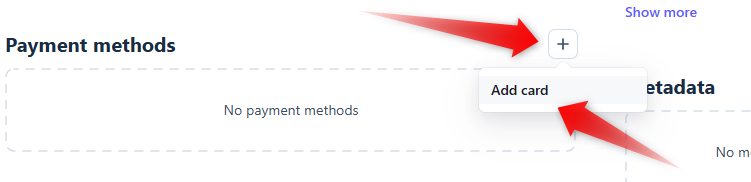
Click Add card.
Enter the card details in the Add a card popup.
Click Add card at the bottom-right of the popup.
The card will now appear in the customer’s Payment methods section with the card number securely redacted.
Testing with a Stripe test card
If your Stripe account is still in test mode and has not yet gone live, you can use a Stripe test card to check how the process works.
For example, Stripe’s standard test Visa card number is:
4242 4242 4242 4242
Use a valid future expiry date and any valid CVC.
More information about Stripe test cards is available here:
https://docs.stripe.com/testing
Charge a stored card
Sign in to the Stripe Dashboard:
https://dashboard.stripe.comClick Customers from the menu on the left.
Search for the customer, then click the customer record to open it.
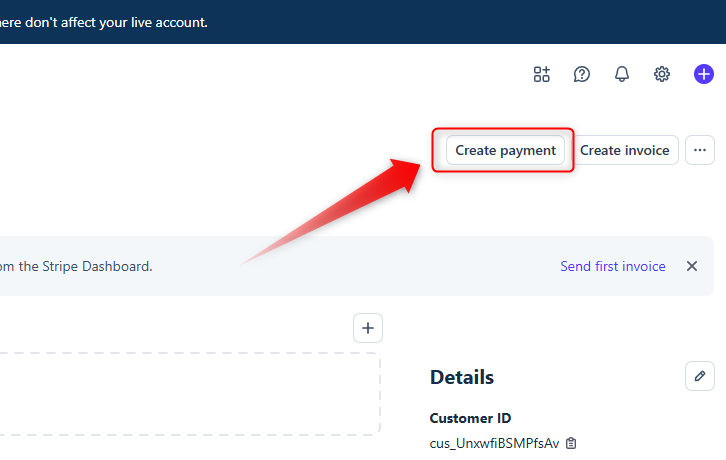
Click Create payment at the top-right.
Check that the Currency is correct.
Enter the payment Amount.
Select the relevant payment card.
If the customer only has one stored card, Stripe may select it automatically.In Statement desc, enter a clear reference to appear on the customer’s card statement.
This would typically be your HirePOS invoice number or customer reference.
Use a prefix as well as the number, for example:
INV-1000Avoid using numbers only, such as:
1000If the payment relates to multiple invoices, you could use a customer reference instead, such as:
CUST-1234Enter a Description for the transaction.
Click Create payment at the bottom-right.
If the payment is successful, Stripe should display a Payment successful notification.
Authorise only / pre-authorisations
For pre-authorisations, where you only want to authorise or hold funds rather than immediately capture the payment, open the Advanced options and select Authorize only before creating the payment.
This option is useful where you need to confirm that funds are available, but do not want to complete the charge immediately.
Important notes
Stripe is a third-party payment provider and operates independently from HirePOS.
HirePOS does not control Stripe account approvals, Stripe Dashboard features, Stripe fees, Stripe payment processing, stored card behaviour, disputes, refunds, card declines, or Stripe’s security and compliance requirements.
Always ensure you have the customer’s permission before storing a card or charging a stored card.
⚠️Do not manually write down, email, or store full card details in HirePOS notes, documents, spreadsheets, or other unsecured locations.
Cards should only be stored using a secure, PCI-compliant payment provider such as Stripe