
Charging Weekly After First Week
This guide explains how to set up a weekly hire charge where the first week is effectively credited on the initial invoice, while future rolled invoices continue charging weekly as normal.
This can be useful where you want to keep the item set up simple by using a standard Week unit, but delay the effective weekly charge until after the first week has passed.
Overview
The simplest approach is to:
Keep the Week unit set up as a normal weekly unit.
Add a standard weekly hire fee item.
Add a separate first week credit item.
Add both items as required Companion items against the main hire item.
Allow only the weekly hire fee to roll over to future invoices.
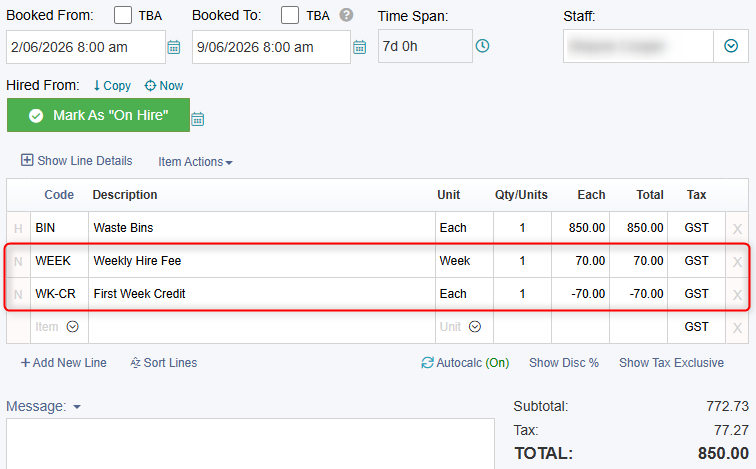
This means the first invoice includes both the weekly hire fee and the matching credit. On future rolled invoices, only the weekly hire fee continues.
Step 1: Keep the Week Unit Simple
Set up the Week unit as a normal weekly unit.
For example:
Unit: Week
Duration: 168 Hours
There is no need for special unit settings or complex billing rules. The Week unit should calculate as a normal weekly hire period.
Step 2: Create the Weekly Hire Fee Item
Create a Non-stock item to represent the normal weekly hire fee.
For example:
Item Type: Non-stock
Item Name: Bin Hire Fee
Unit: Week
Rate: 70.00 per Week
This item represents the normal weekly hire charge and should be left to calculate as a standard weekly hire fee.
Step 3: Create the First Week Credit Item
Create another Non-stock item to represent the first week credit.
For example:
Item Type: Non-stock
Item Name: First Week Credit
Unit: Each
Rate: -70.00
The rate should be entered as a negative amount so that it offsets the first weekly hire fee on the initial invoice.
Step 4: Add Both Items as Required Companions
In the Bin item setup, add both the weekly hire fee item and the first week credit item as required Companion items.
For example, the Bin item may have the following required Companion items:
Bin Hire Fee
First Week Credit
When the Bin is added to a job or invoice, HirePOS will automatically add the weekly hire fee and the first week credit.
The result is that the weekly hire fee calculates normally, while the credit offsets the first week charge on the initial invoice.
Step 5: Configure Invoice Rollover Behaviour
If you roll invoices, the rollover settings are important.
On the weekly hire fee item:
Go to Configurations
Switch ON EOM RollOver Item
On the first week credit item:
Go to Configurations
Leave EOM RollOver Item switched OFF
This ensures that when the invoice is rolled, the weekly hire fee continues onto the next invoice, but the first week credit remains only on the original invoice.
Example
If the weekly hire fee is 70.00 per Week and the first week credit is -70.00 Each, the first invoice may include:
Item | Unit | Amount |
|---|---|---|
Bin Hire Fee | Week | 70.00 |
First Week Credit | Each | -70.00 |
The weekly hire fee still calculates using the normal Week unit, but the first week credit offsets the initial charge.
When the invoice is rolled, the credit item does not roll over. The next invoice will only include the standard weekly hire fee, so charging continues by the Week as normal.
Why This Works
This method keeps the weekly hire setup simple and avoids changing how the Week unit behaves.
The weekly hire fee remains a normal weekly charge, while the separate credit item only applies to the first invoice. Because the credit item is not marked as a rollover item, it automatically drops off future rolled invoices.
This provides a clean way to apply a first week credit without affecting ongoing weekly billing.