
HirePOS Sign-In Methods
HirePOS offers multiple sign-in methods to help protect your account and business data. Some methods provide stronger protection than others.
The following sign-in methods are listed in order from most secure to least secure.
1. Single Sign-On (SSO) – Recommended
Available providers: Microsoft and Google
⏳Coming Soon: Xero SSO
Single Sign-On allows you to sign in to HirePOS using your existing Microsoft, Google or Xero account. Authentication is handled directly by the identity provider, allowing you to benefit from their advanced security features.
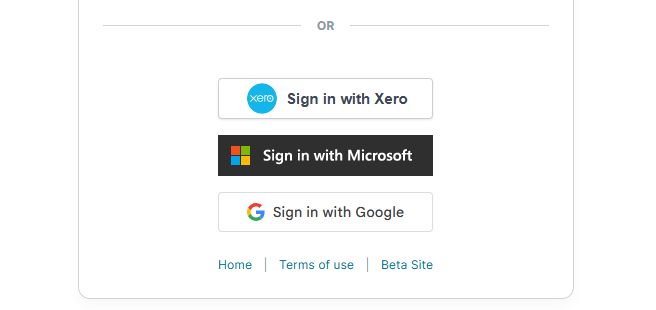
SSO Benefits
Highest level of security available in HirePOS
Uses the security features of Microsoft, Google or Xero
Supports advanced protection features such as phishing resistance, device trust and risk-based authentication
No additional HirePOS password to remember
Simplified user management
Recommended for
All users, particularly businesses using Microsoft 365 or Google Workspace.
Troubleshooting SSO sign-in
I connected SSO. Can I still sign in with my HirePOS password?
If your user account is set to use Single Sign-On, you must continue signing in with the connected provider, such as Microsoft, Google or Xero.
When SSO is enabled for your user account, other sign-in methods such as HirePOS password sign-in, authenticator app codes, and email verification codes are not used for access.
If you are unable to sign in with your SSO provider, check with your internal Microsoft, Google or Xero administrator, or contact HirePOS Support if you need further assistance.
2. Authenticator App (TOTP) – Strong Security
Supported apps: Microsoft Authenticator, Google Authenticator and compatible authenticator applications
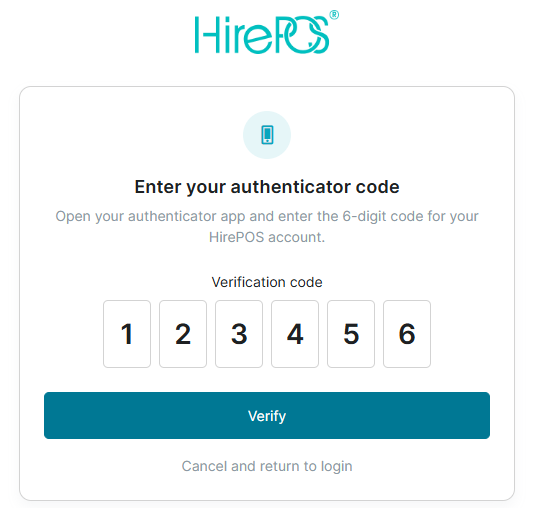
Authenticator apps generate a unique six-digit verification code on your mobile device every 30 seconds. After entering your email address and password, you enter the current code displayed in your authenticator app to complete sign-in.
Authenticator App (TOTP) Benefits
Strong two-factor authentication
Verification codes are generated on your device
Does not rely on Email or SMS delivery
Works even when you are offline
Faster sign-in than email verification codes
Protects against password theft
Recommended for
Users who do not use Single Sign-On but want stronger account protection.
How it works
Sign in with your HirePOS email address and password.
Open your authenticator app.
Enter the current six-digit verification code.
Access your HirePOS account.
When signing in, users may select Remember this browser for 30 days to avoid entering a verification code every time they sign in from the same trusted browser.
Troubleshooting Authenticator App sign-in
My authenticator code is on another phone or app
Authenticator app codes only work from the exact device and authenticator app used when the sign-in method was first set up.
Installing an authenticator app on another phone, tablet, or computer will not automatically give you access to the same HirePOS sign-in codes.
If you no longer have access to the original phone or authenticator app, contact HirePOS Support. You may need to confirm your identity and authority before access can be changed.
3. Email Verification Codes (Email 2FA)
Email-based two-factor authentication provides an additional layer of protection by sending a one-time verification code to your registered email address.
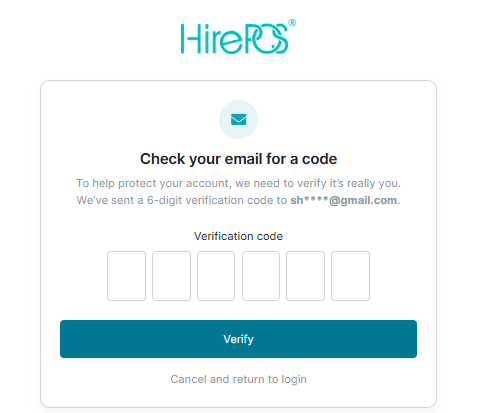
After entering your email address and password, HirePOS sends a six-digit code to your inbox. The code must be entered before access is granted.
Why not send verification codes by SMS?
HirePOS does not recommend SMS verification codes because SMS can be vulnerable to risks such as SIM-swap attacks, mobile number porting fraud, mobile account compromise, message interception, phishing, and loss of access to the phone number.
Email Verification Code Benefits
More secure than password-only sign-in
Easy to use
No additional mobile app required
Helps prevent unauthorised access if a password is compromised
Limitations
Depends on email delivery
Can be slower than authenticator apps
Security depends on the security of your email account
How it works
Sign in with your HirePOS email address and password.
Check your email inbox.
Enter the six-digit verification code.
Access your HirePOS account.
Troubleshooting Email Verification Codes
I did not receive my email verification code
Email verification codes should usually arrive immediately.
If you have not received the code:
Check that you entered the correct email address on the sign-in screen.
Make sure the email address belongs to a real inbox you can access.
Check your junk, spam, clutter, or quarantine folders.
Check whether any email forwarding rules or inbox rules have moved the email to another folder.
Try resending the verification code.
If the code still does not arrive, contact HirePOS Support for assistance.
4. Email Address and Password Only (Legacy Sign-In)
This is the traditional sign-in method using only an email address and password.
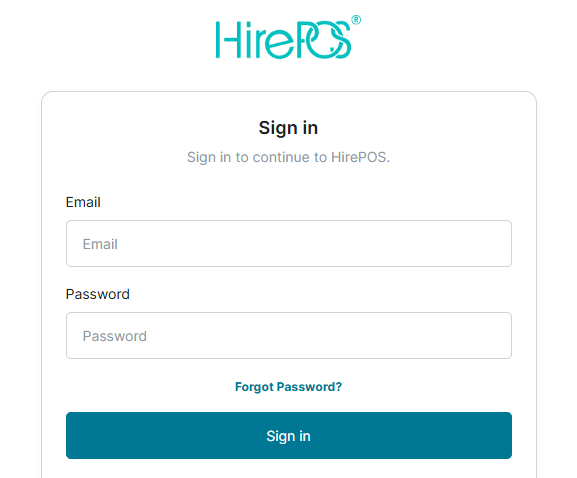
HirePOS requires passwords to meet minimum security requirements, including a minimum length of 12 characters.
Benefits
Simple and familiar
No additional setup required
Limitations
Provides only a single layer of security
More vulnerable to password theft, phishing and credential reuse attacks
Does not provide the additional protection of two-factor authentication
Future Direction
⚠️ Password-only sign-in is considered the least secure authentication method available in HirePOS and will be progressively phased out in favour of stronger authentication methods.
Users are encouraged to migrate to either:
✅ Single Sign-On (Microsoft, Google or Xero), or
✅ Authenticator App (TOTP) authentication
as soon as possible.
Troubleshooting Password Login
I changed my password but I still cannot sign in
Changing your HirePOS password does not change the sign-in method assigned to your user account.
If your account is required to use Single Sign-On or another two-factor authentication method, resetting your password will not let you bypass that requirement. Sign in using the method required for your account.
I forgot my password
Use the Forgot Password link on the HirePOS sign-in screen.
Follow the instructions sent to your registered email address to reset your password. After resetting your password, you may still need to complete any required two-factor authentication or SSO sign-in steps.
Security Recommendation
For the strongest account protection, HirePOS recommends the following order of preference:
😁 Single Sign-On (Microsoft, Google or Xero)
🙂 Authenticator App (Microsoft Authenticator or Google Authenticator)
😐 Email Verification Codes
😡 Password Only (Legacy)
Using a stronger authentication method helps protect your account, your business data and your users from unauthorised access.