
AI-Powered App Navigation
The Global Search feature in HirePOS is designed to enhance user experience by enabling users to quickly locate specific pages and information within the platform. This functionality allows users to ask questions related to various tasks, such as modifying item prices or setting up new customers, and receive relevant search results along with helpful guides.
Important Note
⚠️ This feature is currently in Beta and can only be explored by Administrator users using the Beta site at beta.hirepos.com.
How to Use the Global Search
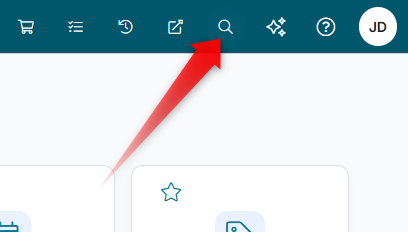
Users can utilise the Global Search feature by clicking the search icon located in the menu bar at the top of the interface.
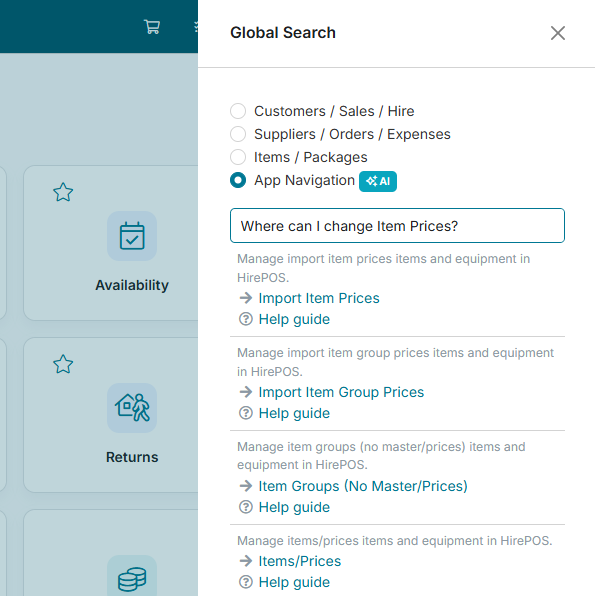
After the search panel slides out from the right, select the App Navigation option.
To initiate a search, enter your question and press enter. For example:
“Where can I change Item Prices?”
“Where do I set up a new customer?”
“Where can I adjust Selling Unit settings?”
Upon entering a query, the search results will display relevant pages along with associated help guides to assist users in navigating the platform effectively.
Example Search Results
For instance, if a user searches for “Where can I change Item Prices?”, the following results may be returned:
Accessing Help Guides
Users can click on the navigational links provided in the search results to be directed straight to the relevant page. Additionally, they can access the associated help guides for more detailed information on each topic.