
Linking a Maintenance Record to Invoices
Edited
There are two ways to link a maintenance record to an Invoice.
The best method to use depends on your process.
Creating a New Maintenance Record From the Invoice
If you create the Invoice for your customer before you create the maintenance record, you can create it directly from the Invoice.
This can be done by clicking the "Maintenance & Inspections" tab then clicking "New Service Record"
Once you save the new maintenance record, it will be automatically linked to the Invoice.

Selecting an Existing Invoice to Link the Maintenance Record to
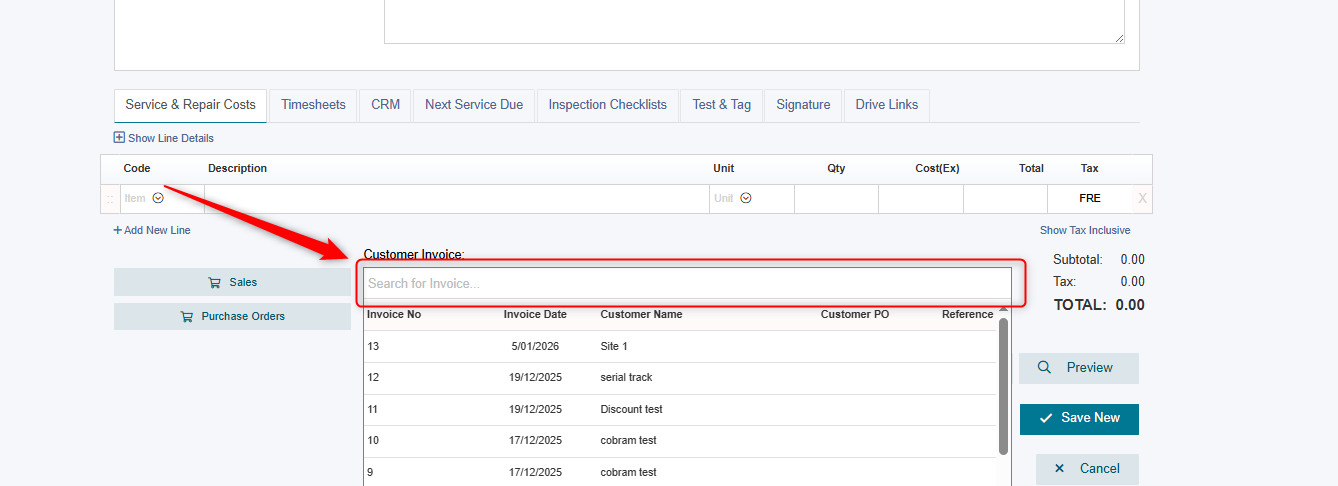
If you already have an Existing Invoice and Maintenance record, then you can also manually select the Invoice you wish to link it to via the "Customer Invoice" dropdown at the bottom of the screen.
maintenance
link invoice
maintenance record
Was this article helpful?
Sorry about that! Care to tell us more?